
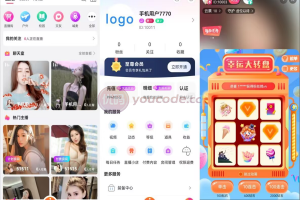
Function introduction:
Gift system: ordinary gifts, luxury gifts, popular gifts, guardian gifts, lucky gifts
Withdrawal method: Unify the withdrawal date and method on the platform to facilitate users to perform deposit and withdrawal operations
Lianmai Gifts PK: Hosts can interact with each other to Lianmai Gifts PK, and there will be corresponding rewards and punishments at the end of the PK.
Live broadcast room red envelopes: Both platform anchors and users can send red envelopes. There are various red envelope types and red envelope reminders.
Anchor protection: You can recharge the platform to protect your favorite anchors. There are various settings for the anchor protection time.
Short video shooting: a separate small video module, including video list, video shooting, editing, uploading, interaction, etc.
Guide map function: Optimize and update the system guide map. Pictures or video content can be uploaded in the background, and video content can be skipped.
Dynamics: Click on the dynamics to enter the dynamics details page. Click on the dynamics of the topic to enter the dynamic list of the topic. You can view all dynamic information under the topic. Users can like, comment, report, etc. on the dynamics.
Mall: You can search for products by product name, and after searching, you can filter based on sales price, etc.
Product details: View the name, price, sales volume, and evaluation of the product. You can enter the store, communicate with customer service, and purchase directly.
Gift-Giving Tips for Live Broadcast Viewing: After the user gives a gift, there will be a gift-giving tip in the public screen chat in the live broadcast room.
Live shopping cart: Viewers can view the products in the anchor’s live shopping cart in the live broadcast room. Click on a product to jump to the product introduction page. There is a purchase button on the product introduction. Click to purchase directly.
Voice chat room: Users and anchors can connect to each other. During the process, the window can be minimized. After minimization, it will be displayed in the form of a floating window. The floating window can be moved.
Associate paid content: Users who have enabled paid content can choose to associate the paid content they uploaded when publishing videos. There is a view video content button at the bottom left of the video associated with paid content. Click to jump to the content details page.
Watermark function: A watermark will be automatically added to the short video posted by the user when downloaded locally, and the watermark image can be set in the background
In addition to the above special functions, the system has all the basic function settings of a carrier-grade mobile live broadcast platform.

